 Simon Cambier
7ddae6dc08
Simon Cambier
7ddae6dc08
commit 603b9bbde4c6efc90c81032e4e765c64d3075e75
Author: Simon Cambier <simon.cambier@protonmail.com>
Date:   Tue Oct 11 21:47:03 2022 +0200

    Basic PDF indexing ok

commit 200331bb5c5111493af1e1f6ef8cd4bbfbdbfd4f
Author: Simon Cambier <simon.cambier@protonmail.com>
Date:   Tue Oct 11 20:56:44 2022 +0200

    Tweaks and comments

commit 434b9662d40c5fea9d8b28d43828b11916db8c94
Author: Simon Cambier <simon.cambier@ores.be>
Date:   Tue Oct 11 16:22:55 2022 +0200

    Refactoring notes & minisearch cache

commit 7253c676c8ed161782ba8e33f0c4c162880925ad
Author: Simon Cambier <simon.cambier@protonmail.com>
Date:   Tue Oct 11 09:50:33 2022 +0200

    wip

commit 77736e6ef6f28ccfddb64fb768732927d43bbd77
Author: Simon Cambier <simon.cambier@protonmail.com>
Date:   Mon Oct 10 20:49:02 2022 +0200

    Small rewrites & deps updates

commit 59845fdb89eb6a3ad3f3f9ad75b39e7a3e604c45
Author: Simon Cambier <simon.cambier@protonmail.com>
Date:   Mon Oct 10 12:22:11 2022 +0200

    wasm + worker ok

commit 1cf3b506e56147586cd0ebcc003642c5230e04cc
Author: Simon Cambier <simon.cambier@protonmail.com>
Date:   Sun Oct 2 20:04:49 2022 +0200

    no disk access, of course

commit eb3dd9dd4f616a479a53e10856f6c96c6725e911
Author: Simon Cambier <simon.cambier@protonmail.com>
Date:   Sun Oct 2 19:08:48 2022 +0200

    Rollup build ok

commit 54f2b7e615456c0e1b1504691689d1ba2c72d9e8
Author: Simon Cambier <simon.cambier@protonmail.com>
Date:   Sun Oct 2 16:03:31 2022 +0200

    Rollup build + wasm PoC
Omnisearch for Obsidian





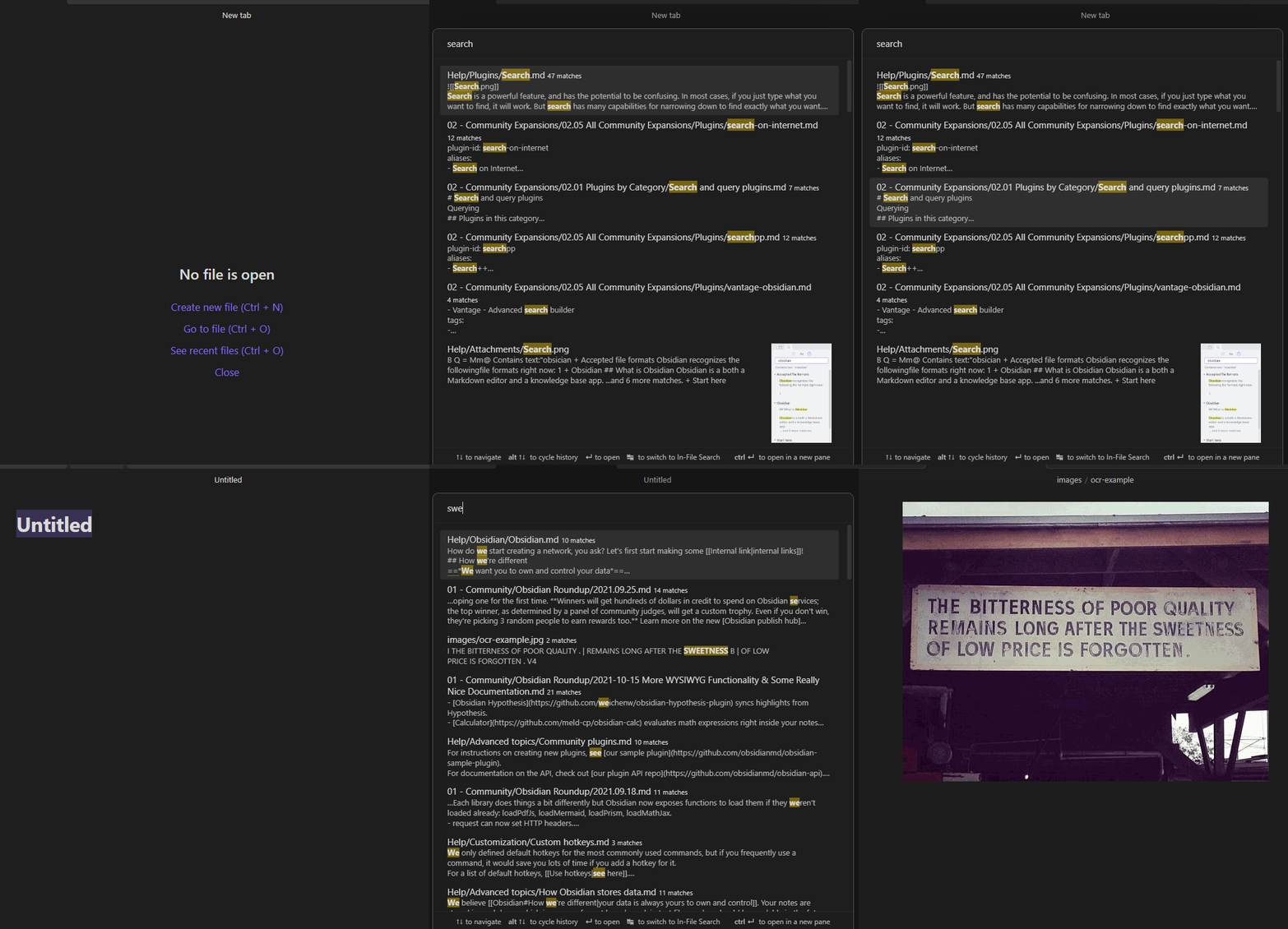
Omnisearch is a search engine that "just works". It always instantly shows you the most relevant results, thanks to its smart weighting algorithm.
Under the hood, it uses the excellent MiniSearch library.
Features
- Automatic document scoring using the BM25 algorithm
- The relevance of a document against a query depends on the number of times the query terms appear in the document, its filename, and its headings
- Can search other plaintext files (configurable in settings)
- Workflow similar to "Quick Switcher" plugins
- Keyboard first: you never have to use your mouse
- Resistance to typos
- Switch between Vault and In-file search to quickly skim multiple results in a single note
- Supports
"expressions in quotes"and-exclusions - Directly Insert a
[[link]]from the search results - Respects Obsidian's "Excluded Files" list - results are downranked, not hidden
- Optional support for Vim navigation keys (ctrl + j, k, n, p)
Note: support of Chinese, Japanese, Korean, etc. depends on this additional plugin. Please read its documentation for more information.
Installation
- Omnisearch is available on the official Community Plugins repository.
- Beta releases can be installed through BRAT. Be advised that those versions can be buggy.
You can check the CHANGELOG for more information on the different versions.
Usage
Omnisearch can be used within 2 different contexts:
Vault Search
Omnisearch's core feature, accessible with the Command Palette "Omnisearch: Vault search". This modal searches through your vault and returns the most relevant notes. That's all you need to find a note.
If you want to list all the search matches of a single note, you can do so by using tab to open the In-File Search.
In-File Search
Also accessible through the Command Palette "Omnisearch: In-file search". This modal searches through the active note's content and lists the matching results. Just press enter to automatically scroll to the right place.
Public API
This API is an experimental feature, the
ResultNoteinterface may change in the future. Thesearch()function returns at most 50 results.
If you're a plugin developer, you can use this "plugin-api" package, and get the api through pluginApi('omnisearch').
Otherwise, you can access it with app.plugins.plugins.omnisearch.api.
// API:
{
  // Returns a promise that will contain the same results as the Vault modal
  search: (query: string) => Promise<ResultNote[]>
}

type ResultNoteApi = {
  score: number
  path: string
  basename: string
  foundWords: string[]
  matches: SearchMatch[]
}

type SearchMatch = {
  match: string
  offset: number
}
Dataview Integration
You can use the Omnisearch API directly within the Dataview plugin.
```dataviewjs
const results = await app.plugins.plugins.omnisearch.api.search('your query')
const arr = dv.array(results).sort(r => r.score, 'desc')
dv.table(['File', 'Score'], arr.map(o => [dv.fileLink(o.path), Math.round(o.score)]))
```
CSS Customization
There are several CSS classes you can use to customize the appearance of Omnisearch.
.omnisearch-modal
.omnisearch-result
.omnisearch-result__title
.omnisearch-result__counter
.omnisearch-result__body
.omnisearch-highlight
.omnisearch-input-container
.omnisearch-input-field
For example, if you'd like the usual yellow highlight on search matches, you can add this code inside a CSS snippet file:
.omnisearch-highlight {
    color: var(--text-normal);
    background-color: var(--text-highlight-bg);
}
See styles.css for more information.
LICENSE
Omnisearch is licensed under GPL-3.
Sponsors
