
123 lines
4.8 KiB
Markdown
123 lines
4.8 KiB
Markdown
# Omnisearch for Obsidian
|
|
|
|
[](https://github.com/sponsors/scambier)
|
|

|
|

|
|

|
|

|
|
|
|
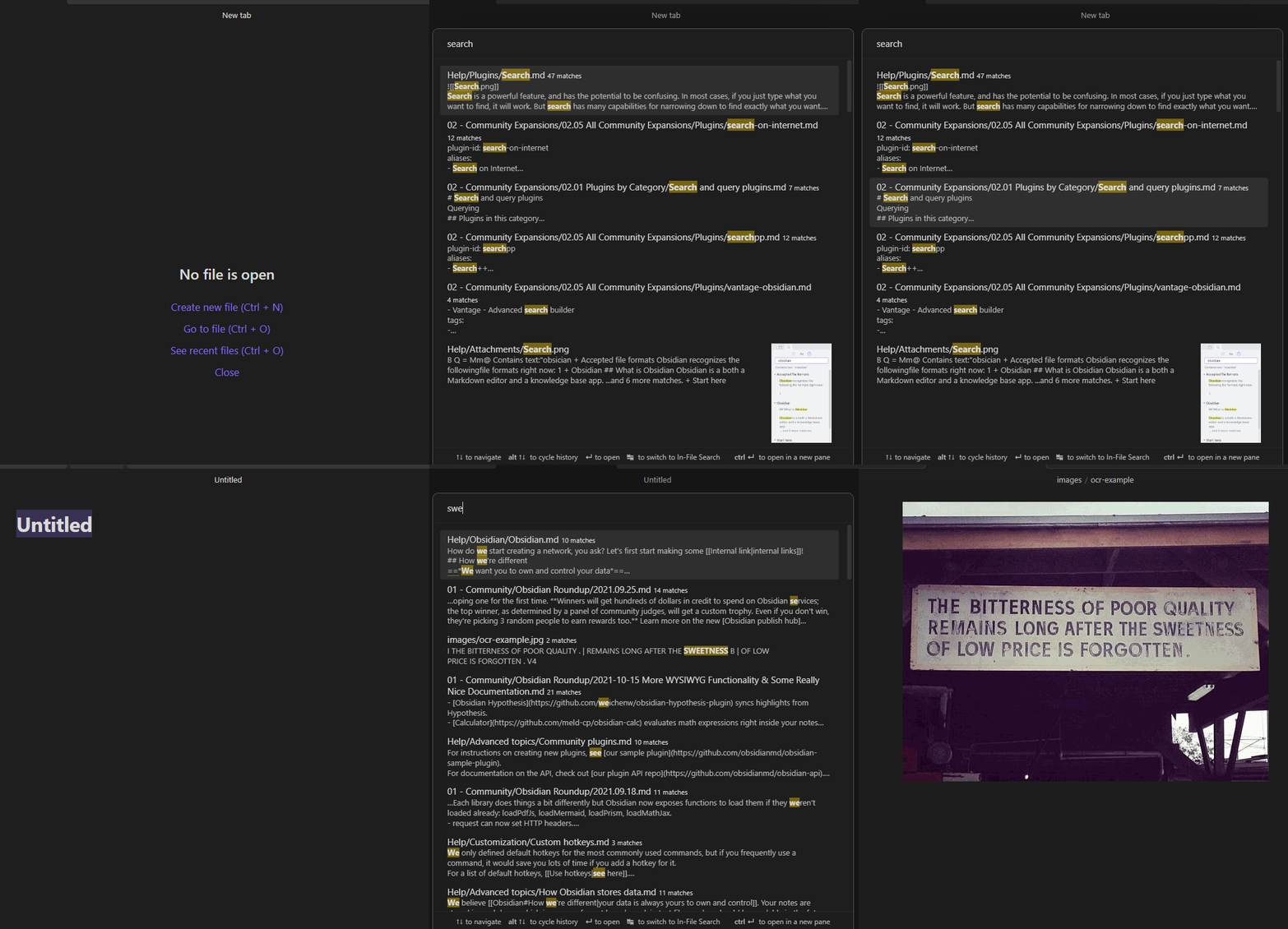
**Omnisearch** is a search engine that "_just works_". It always instantly shows you the most relevant results, thanks to its smart weighting algorithm.
|
|
|
|
Under the hood, it uses the excellent [MiniSearch](https://github.com/lucaong/minisearch) library.
|
|
|
|
|
|
|
|
## Features
|
|
|
|
- Automatic document scoring using the [BM25 algorithm](https://github.com/lucaong/minisearch/issues/129#issuecomment-1046257399)
|
|
- The relevance of a document against a query depends on the number of times the query terms appear in the document, its filename, and its headings
|
|
- Keyboard first: you never have to use your mouse
|
|
- Workflow similar to "Quick Switcher" plugins
|
|
- Resistance to typos
|
|
- Switch between Vault and In-file search to quickly skim multiple results in a single note
|
|
- Supports `"expressions in quotes"` and `-exclusions`
|
|
- Directly Insert a `[[link]]` from the search results
|
|
- Respects Obsidian's "Excluded Files" list - results are downranked, not hidden
|
|
- Optional support for Vim navigation keys (ctrl + j, k, n, p)
|
|
|
|
**Note:** support of Chinese, Japanese, Korean, etc. depends on [this additional plugin](https://github.com/aidenlx/cm-chs-patch). Please read its documentation for more information.
|
|
|
|
## Installation
|
|
|
|
- Omnisearch is available on [the official Community Plugins repository](https://obsidian.md/plugins?search=Omnisearch).
|
|
- Beta releases can be installed through [BRAT](https://github.com/TfTHacker/obsidian42-brat). **Be advised that those versions can be buggy.**
|
|
|
|
You can check the [CHANGELOG](./CHANGELOG.md) for more information on the different versions.
|
|
|
|
## Usage
|
|
|
|
Omnisearch can be used within 2 different contexts:
|
|
|
|
### Vault Search
|
|
|
|
Omnisearch's core feature, accessible with the Command Palette "**_Omnisearch: Vault search_**". This modal searches through your vault and returns the most relevant notes. That's all you need to _find_ a note.
|
|
|
|
If you want to list all the search matches of a single note, you can do so by using `tab` to open the In-File Search.
|
|
|
|
### In-File Search
|
|
|
|
Also accessible through the Command Palette "**_Omnisearch: In-file search_**". This modal searches through the active note's content and lists the matching results. Just press enter to automatically scroll to the right place.
|
|
|
|
|
|
## Public API
|
|
|
|
> This API is an experimental feature, the `ResultNote` interface may change in the future. The `search()` function returns at most 50 results.
|
|
|
|
If you're a plugin developer, you can use [this "plugin-api" package](https://github.com/vanakat/plugin-api), and get the api through `pluginApi('omnisearch')`.
|
|
|
|
Otherwise, you can access it with `app.plugins.plugins.omnisearch.api`.
|
|
|
|
```ts
|
|
// API:
|
|
{
|
|
// Returns a promise that will contain the same results as the Vault modal
|
|
search: (query: string) => Promise<ResultNote[]>
|
|
}
|
|
|
|
type ResultNoteApi = {
|
|
score: number
|
|
path: string
|
|
basename: string
|
|
foundWords: string[]
|
|
matches: SearchMatch[]
|
|
}
|
|
|
|
type SearchMatch = {
|
|
match: string
|
|
offset: number
|
|
}
|
|
```
|
|
|
|
### Dataview Integration
|
|
|
|
You can use the Omnisearch API directly within the [Dataview](https://blacksmithgu.github.io/obsidian-dataview/) plugin.
|
|
|
|
~~~js
|
|
```dataviewjs
|
|
const results = await app.plugins.plugins.omnisearch.api.search('your query')
|
|
const arr = dv.array(results).sort(r => r.score, 'desc')
|
|
dv.table(['File', 'Score'], arr.map(o => [dv.fileLink(o.path), Math.round(o.score)]))
|
|
```
|
|
~~~
|
|
|
|
## CSS Customization
|
|
|
|
There are several CSS classes you can use to customize the appearance of Omnisearch.
|
|
|
|
```css
|
|
.omnisearch-modal
|
|
.omnisearch-result
|
|
.omnisearch-result__title
|
|
.omnisearch-result__counter
|
|
.omnisearch-result__body
|
|
.omnisearch-highlight
|
|
```
|
|
|
|
For example, if you'd like the usual yellow highlight on search matches, you can add this code inside a CSS snippet file:
|
|
|
|
```css
|
|
.omnisearch-highlight {
|
|
color: var(--text-normal);
|
|
background-color: var(--text-highlight-bg);
|
|
}
|
|
```
|
|
|
|
|
|
## LICENSE
|
|
|
|
Omnisearch is licensed under [GPL-3](https://tldrlegal.com/license/gnu-general-public-license-v3-(gpl-3)).
|
|
|
|
## Sponsors
|
|
|
|

|